
The law requires you to register your phone line and make sure nobody is using your CURP. Telcel puts a captcha between you and that information, and even when you solve it correctly, it rejects you. Let's talk about why that is a design decision, not a technical necessity.
Since January 2026, every mobile line in Mexico must be linked to its owner's CURP, the national population registry ID. It is the rule behind the new registry overseen by the Telecommunications Regulatory Commission (CRT). The deadline was first set for June 30. Then came a staggered extension based on the last digit of each number, with cutoffs running from August to December 31. If your line is not linked in time, the carrier suspends it.
The message from the government and the carriers is clear: it's your responsibility. Register your line and make sure nobody has used your CURP to activate numbers that aren't yours.
So far, so good. The trouble starts when you try to do exactly that with Telcel.
What happens when you try to check your lines
I wanted to do what the law asks of me: go to Telcel's portal and see which lines are registered under my name. Before showing anything, a "Verificación de seguridad" (security check) pops up.
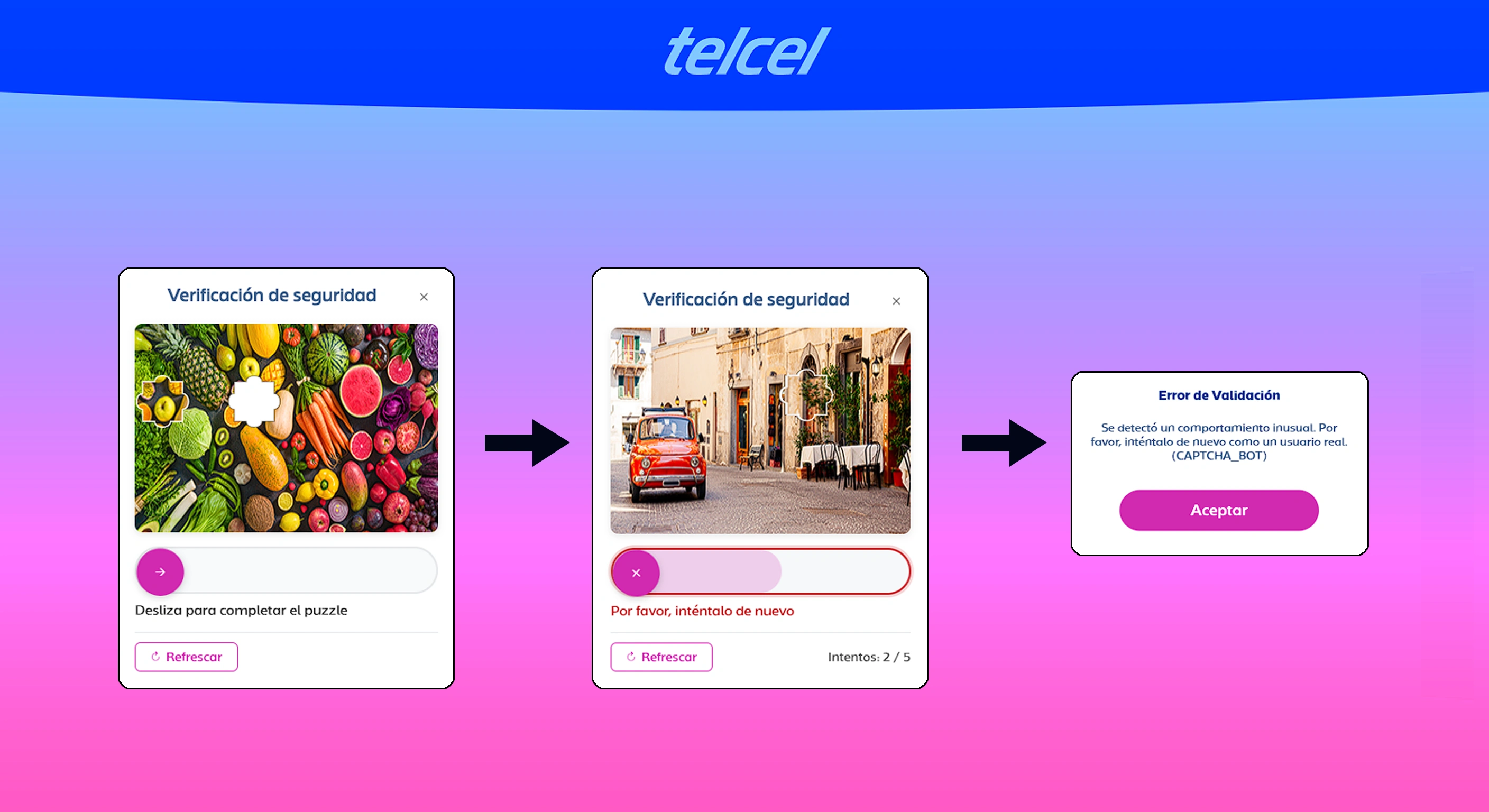
This is how it went:
- A slider puzzle. A photo of fruits and vegetables with a gap in it, and a bar to drag the piece into place: "Desliza para completar el puzzle" (slide to complete the puzzle).
- "Por favor, inténtalo de nuevo" (please try again). I place the piece exactly in its slot. The system says no, swaps the picture for another one (a street with a red car), and shows a counter: Intentos: 2 / 5 (attempts: 2 of 5).
- The door slams shut. A "Validation Error" window: "Unusual behavior was detected. Please try again as a real user." And, in parentheses, the internal code: CAPTCHA_BOT.
I repeated it several times. The result was always the same: the captcha is solved correctly and it still throws an error. It's not that I got the piece wrong. It's access denied, systematically.
And that changes everything. A hard captcha is a usability problem. A captcha that rejects correct answers is no longer a check at all: it's a locked door with a puzzle painted on it.
Look at what that last message says. It doesn't say "something went wrong." It says you are not a real user. The owner of the line, trying to look up their own data to comply with a mandatory procedure, ends up labeled a bot. And the system doesn't even bother to hide its internal error code.
There's another detail that isn't obvious at first glance: none of those screens offers an alternative. No audio option, no "verify me by SMS," no help link. If your hands shake, your eyesight is poor, or you simply have an awkward trackpad, a puzzle that demands pixel-perfect precision is a barrier, not a verification.
This isn't an isolated case. Since the registry launched, the press has documented blank screens, processes stuck "validating" forever, and users who managed to register only one of several lines (Milenio, La Jornada). The circulating guide for checking your lines literally includes "completing the security check (captcha)" and recommends doing it from your phone, because on a computer it "may fail" (El CEO). Remote registration is also limited to three attempts. At a store, there's no limit.
Read that again: the digital channel has more locks than the counter.
A captcha isn't security, it's friction
This is where I speak as someone who designs systems for a living.
A captcha does one thing: tell humans from bots. It doesn't verify that you own anything. It doesn't protect your data. It only slows down automated traffic. And for that, there are tools today that users never even see: rate limits per IP and per CURP, invisible risk-based captchas, SMS verification to the number being checked.
And note that last one: Telcel already uses an SMS code. After it was reported in January that the portal displayed the owner's details just by typing in a number (Xataka, Milenio), the company responded that each user receives a unique code by text message so they can see "only their own information." If the SMS is what actually identifies the owner, a captcha on top adds no protection. It adds friction.
And friction has an effect that anyone who has designed a conversion funnel knows well: every extra step makes some people give up. In an online store, that's measured in lost sales. Here, it's measured in people who couldn't check whether someone used their identity to activate a line.
Pretext or negligence? In practice, it doesn't matter
I don't know what gets discussed in Telcel's meetings. Maybe someone decided that fewer lookups means less load on their servers, fewer "orphan" lines detected, and fewer complaints to handle. Maybe it's simply a system built badly under time pressure, with a bot detector so aggressive it treats everyone as a suspect.
But for the user, the outcome is the same: information about their own identity sits behind a wall the company chose to build. Meanwhile, the suspension clock keeps ticking, and the user, not the carrier, pays the price for failing.
When a procedure is required by law and has a deadline with a penalty, the burden of making it work should fall on whoever runs the system, not on whoever suffers it.
What it would look like if it were designed with the user in mind
Nothing needs to be invented:
- SMS verification to the number, and that's it. If the code reaches your phone, it's you. No visual riddles.
- Invisible bot protection. Limits per IP, per CURP and per number, with a challenge only when behavior looks suspicious.
- Works the same on desktop and mobile. "Better do it from your phone" isn't a solution; it's accepting a defect.
- Same rules online as in the store. If there's no attempt limit at the counter, there shouldn't be one online either.
- Proactive alerts. Telcel knows which lines are tied to your CURP. It could text you: "You have 3 lines under your name. Do you recognize them?" No searching required.
- Error messages that say what happened and what to do. "Please wait" is not an error message, and "try again as a real user" with a CAPTCHA_BOT code isn't one either: it blames the user and offers no way out.
- An accessible alternative. If you're going to use a challenge, offer audio or SMS verification. A puzzle that demands mouse precision shuts out people with motor or visual disabilities.
What you can do in the meantime
- Check the CRT portal for the deadline that applies to your number's last digit.
- Try the lookup from your phone, at low-traffic hours.
- If that fails, go to a Telcel Customer Service Center: there's no captcha and no attempt limit there.
- If you find lines you don't recognize, report them right away and keep evidence (screenshots, ticket numbers).
- If the portal prevents you from completing a mandatory procedure, you can file a complaint with Profeco (Mexico's consumer protection agency) and with the CRT.
The registry was born with the promise of giving users more control and security. A system that makes it hard for owners to see their own data works against that very goal. Well-designed security goes unnoticed. What you do notice is a wall.
Have you had a similar experience with Telcel or another carrier? Tell us.
Sources (in Spanish)
- Milenio: Telcel registry site failures
- Milenio: Is Telcel exposing personal data online?
- Xataka México: registry failures in its first days
- El CEO: Telcel launches site to check whether your CURP was used on more than one line
- La Jornada: how to register your line with your CURP
- Excélsior: CRT extension and calendar
- El Universal: CRT announces registry extension
Conversation